
Docs / Vendor onboarding
Connect Shopify webhooks to Relin
Use this when Shopify store events need to reach your app reliably. Relin receives Shopify HTTPS webhooks, verifies the Shopify HMAC header, keeps the payload available for inspection, and helps you recover from failed downstream deliveries.
What you need
Relin access
Owner or admin access to the Relin workspace where events should land.
Shopify access
Admin access to the Shopify account or app where you configure webhooks.
Test event
A safe Shopify test event or development account you can use before production traffic.
1. Create the Shopify source in Relin
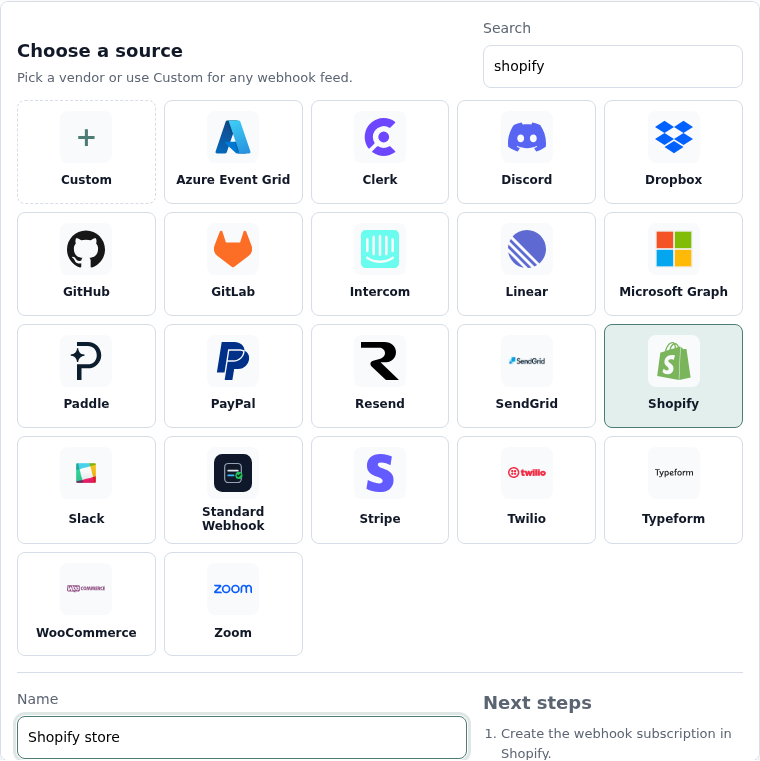
- In Relin, open Developer → Inbound.
- Click Add source.
- Select the Shopify tile.
- Name the source, for example Shopify store.
- Save the source and copy the ingest URL. You will paste this URL into Shopify.
2. Configure Shopify
- Open the Shopify app or custom app that should emit webhooks.
- Subscribe to the webhook topics your app needs, using HTTPS delivery.
- Use the Relin ingest URL as the webhook endpoint URL.
- Make sure the app has the scopes required for each topic.
- Deploy or save the webhook subscription configuration.
Recommended Shopify topics
Orders
orders/create
orders/updated
orders/paid
refunds/create
orders/updated
orders/paid
refunds/create
Compliance
customers/data_request
customers/redact
shop/redact
customers/redact
shop/redact
3. Copy the Shopify app secret into Relin
- Open the app credentials for the Shopify app that signs the webhook.
- Copy the app client secret or webhook secret used to generate X-Shopify-Hmac-SHA256.
- Return to the Relin source settings page and paste it into Signing secret.
- Save the source.

4. Send a test event
- Trigger a subscribed Shopify event, such as creating a test order in a development store.
- Open Relin Events and filter to the Shopify source.
- Confirm the new event has signature status verified.
Shopify notes
- Shopify requires HTTPS delivery with a valid certificate. Relin's ingest URL is already HTTPS.
- Shopify expects a fast 2xx response. Relin acknowledges receipt quickly, then handles forwarding and retries separately.
Troubleshooting
- No event in Relin: confirm the webhook subscription endpoint is the Relin ingest URL, not your app's endpoint.
- Signature failed: confirm the source uses the secret from the Shopify app that emitted the webhook.
- A subscription disappeared: Shopify can delete failing Admin API subscriptions after repeated failures; recreate it with the Relin URL.
Official references
Next
- Add a destination so Relin can forward events to your app.
- Configure retry policy for resilient delivery.
- Set up alerts for failed deliveries or missing events.