
Docs / Vendor onboarding
Connect Slack webhooks to Relin
Use this when a Slack app should send Events API callbacks to your product. Relin handles Slack URL verification, verifies signed requests, records app lifecycle events, and forwards subscribed events to your destinations.
What you need
Relin access
Owner or admin access to the Relin workspace where events should land.
Slack access
Admin access to the Slack account or app where you configure webhooks.
Test event
A safe Slack test event or development account you can use before production traffic.
1. Create the Slack source in Relin
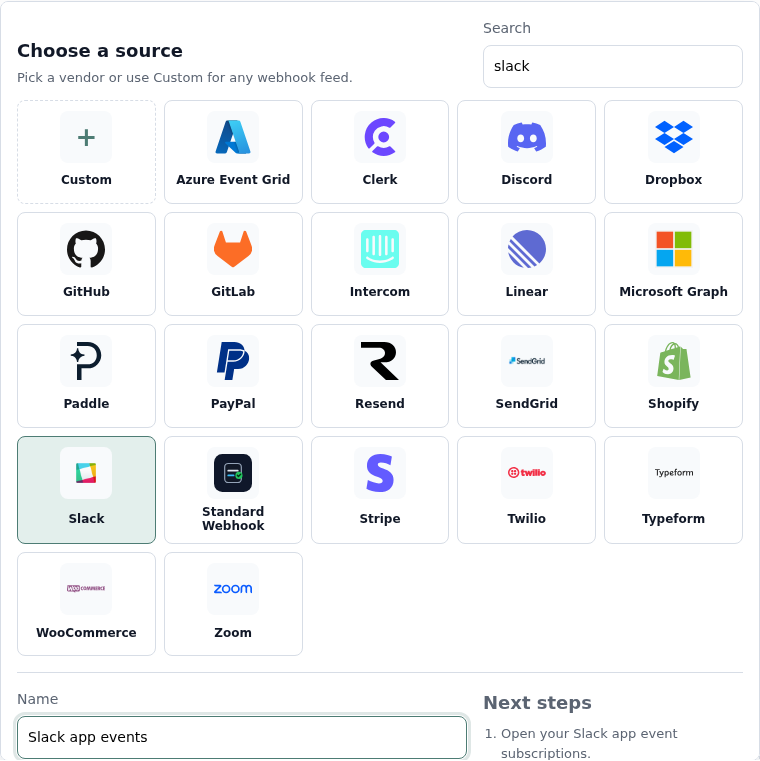
- In Relin, open Developer → Inbound.
- Click Add source.
- Select the Slack tile.
- Name the source, for example Slack app events.
- Save the source and copy the ingest URL. You will paste this URL into Slack.
2. Configure Slack
- Open your Slack app in the Slack app dashboard.
- Open Event Subscriptions.
- Enable events and paste the Relin ingest URL as the Request URL.
- Wait for Slack to verify the URL. Relin responds to the challenge automatically.
- Subscribe to the bot or workspace events your product needs.
- Save changes and reinstall the app if Slack asks for new scopes.
Recommended Slack events
App lifecycle
app_installed
app_uninstalled
tokens_revoked
app_uninstalled
tokens_revoked
Workspace activity
app_mention
message.channels
reaction_added
message.channels
reaction_added
3. Copy the Slack signing secret into Relin
- Open Basic Information for the Slack app.
- Copy the Signing Secret from App Credentials.
- Return to the Relin source settings page and paste it into Signing secret.
- Save the source.

4. Send a test event
- Trigger a subscribed Slack event, such as mentioning the app if you subscribed to app_mention.
- Open Relin Events and filter to the Slack source.
- Confirm the event has signature status verified.
Slack notes
- Slack sends a url_verification request when you save the Request URL. Relin answers that handshake automatically.
- Slack can rate-limit event delivery and sends app_rate_limited events that Relin records.
Troubleshooting
- URL verification fails: confirm the Request URL is the exact Relin ingest URL.
- Signature failed: use the Signing Secret from Basic Information, not the deprecated verification token.
- Events stop arriving: check whether the Slack app needs reinstalling after scope changes.
Official references
Next
- Add a destination so Relin can forward events to your app.
- Configure retry policy for resilient delivery.
- Set up alerts for failed deliveries or missing events.