
Docs / Vendor onboarding
Connect Stripe webhooks to Relin
Use this when Stripe sends billing, checkout, payment, subscription, or Connect events into your product. Relin receives the events, verifies Stripe signatures, records every delivery attempt, and alerts when expected Stripe lifecycle events do not arrive.
What you need
Relin access
Owner or admin access to the Relin workspace where events should land.
Stripe access
Developer or administrator access in the Stripe account you are configuring.
Mode choice
Use separate Relin sources for Stripe test mode and live mode.
1. Create the Stripe source in Relin
- In Relin, open Developer → Inbound.
- Click Add source.
- Select the Stripe tile.
- Name the source so the mode is obvious, such as Stripe test or Stripe live.
- Save the source and copy the ingest URL. You will paste this URL into Stripe.
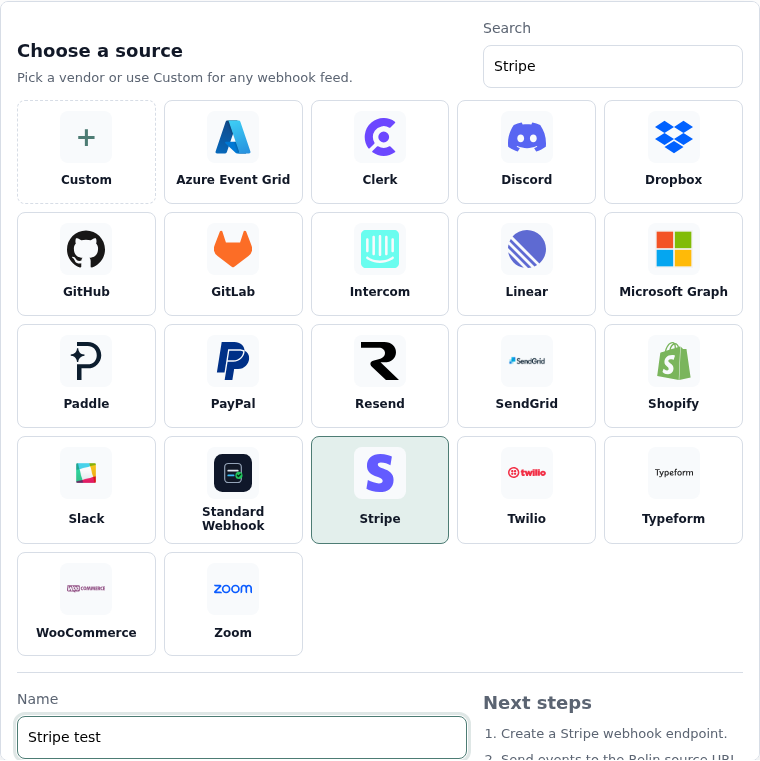
Relin screen to look for
Add source
Pick the Stripe tile, name the source, then save.
Source name: Stripe test
Ingest URL
Copy the full URL and paste it into Stripe.
2. Create the webhook endpoint in Stripe
- Open the Stripe Dashboard and switch to the correct mode: Test mode or Live mode.
- Go to Developers → Webhooks. Stripe also exposes this under Workbench → Webhooks in newer dashboards.
- Click Create an event destination or Add endpoint.
- Choose events from Your account. For Connect platforms, choose Connected accounts only when you are configuring the platform-level Connect webhook.
- Paste the Relin ingest URL into the endpoint URL field.
- Select the event types your app depends on, then save the endpoint.
Stripe screen to look for
Endpoint URL
Paste the Relin ingest URL as the endpoint destination.
Events
Select the Stripe events your application handles.
Signing secret
Reveal the whsec_ value after the endpoint is saved.
Recommended Stripe events
Start with the events your application already handles. If you are unsure, these groups cover the common billing and payment lifecycles Relin can monitor well.
Billing
invoice.paid
invoice.payment_failed
customer.subscription.created
customer.subscription.updated
customer.subscription.deleted
Checkout + payments
payment_intent.succeeded
payment_intent.payment_failed
charge.succeeded
charge.failed
charge.refunded
3. Copy the Stripe signing secret into Relin
- In Stripe, open the endpoint you just created.
- Find Signing secret and click Reveal.
- Copy the value that starts with
whsec_. - Return to the Relin source settings page and paste it into Signing secret.
- Save the source.
Important: Stripe uses a different signing secret for each endpoint and mode. Do not reuse a live-mode secret on a test-mode Relin source.

4. Send a test event
- In Stripe, open the webhook endpoint.
- Use Send test event, or trigger a test event with the Stripe CLI.
- Choose an event type subscribed by the endpoint, such as
payment_intent.succeededorinvoice.paid. - Send the event.
5. Confirm it worked in Relin
- Open the Relin Events view.
- Filter to the Stripe source you created.
- Open the newest event.
- Confirm the signature status is verified.
- If you already added a destination, confirm the delivery attempt returned the status your endpoint expects.
Stripe Connect platforms
If your product uses Stripe Connect, use Relin's Stripe connection controls on the source settings page. Relin receives Connect events through one platform-level webhook and matches each event to the connected account. Individual connected accounts do not need their own Relin webhook endpoint.
Troubleshooting
- No event in Relin: confirm the Stripe endpoint URL exactly matches the Relin ingest URL, including the token at the end.
- Signature failed: re-copy the endpoint's
whsec_secret from the same Stripe mode and endpoint. - Stripe reports a non-2xx response: open the matching Relin event and inspect the delivery attempt. Stripe delivery to Relin and Relin delivery to your app are separate checks.
- Expected invoice events are missing: make sure the endpoint subscribes to both start and terminal lifecycle events, such as
invoice.finalizedandinvoice.paid.
Official Stripe references
Next
- Add a destination so Relin can forward Stripe events to your app.
- Configure retry policy for resilient delivery.
- Set up alerts for failed deliveries or missing Stripe lifecycle events.